Guided Workflow: GBT Burst
This example follows a public GBT-L burst from loading through preparation, measurement, a residual-DM sweep, and session replay. The reference outputs were generated with the published FLITS 1.2.0 package and Python 3.12.6.
The cutout is already dedispersed. Load it with DM = 0 and interpret the
DM sweep as a residual diagnostic. Its original filename contains D527_851,
but the upstream absolute dedispersion time reference is not established by
this example. The reference checks below validate intensity measurements and
the residual sweep, not absolute or infinite-frequency arrival times.
1. Download the data and reference environment
The filterbank is a public GitHub release asset. Download it and check its SHA-256 digest:
mkdir -p tutorial-data
curl --fail --location -o tutorial-data/flits-tutorial-gbt-frb20240114a-v1.fil \
  https://github.com/DirkKuiper/flits/releases/download/tutorial-data-v1/flits-tutorial-gbt-frb20240114a-v1.fil
python -c "import hashlib, pathlib; p = pathlib.Path('tutorial-data/flits-tutorial-gbt-frb20240114a-v1.fil'); assert hashlib.sha256(p.read_bytes()).hexdigest() == 'e80c69842cdd5f41b5a1fc617b7b2cebd864c121e27830bbb5d2161af539a2cc'; print('Checksum verified')"
Use Python 3.12 and the downloadable reference requirements for a pinned runtime environment. Save that file in your working directory, then run:
python3.12 -m venv .venv-gbt
source .venv-gbt/bin/activate
python -m pip install -r gbt-reference-requirements.txt
flits --data-dir ./tutorial-data --host 127.0.0.1 --port 8123
On Windows, activate with .venv-gbt\Scripts\activate instead. An existing
FLITS installation can also follow the interface steps; use the pinned
environment when comparing exact reference values.
2. Load the burst
Open http://127.0.0.1:8123 and select
flits-tutorial-gbt-frb20240114a-v1.fil. Enter 0 for DM, select the GBT
preset, and load the session.
Check that there are 256 channels, a native sample time of 10.24 microseconds, and a total time span of about 423 ms. The bright burst is near 240 ms. The GBT preset supplies a nominal SEFD of 10 Jy.
3. Prepare a reproducible selection
Use these settings exactly:
| Setting | Value |
|---|---|
| Time downsampling factor | 32 (327.68 microseconds per bin) |
| Frequency downsampling factor | 1 |
| Event window | 235 to 250 ms |
| First off-pulse window | 221 to 233 ms |
| Second off-pulse window | 260 to 280 ms |
| Spectral window | 1300 to 1750 MHz |
| Channel mask | None; do not run Auto Mask for this reference |
The off-pulse windows are separate from the event and set the background and noise estimates. FLITS quantizes selections to available bins, so the measured event duration and bandwidth differ slightly from the requested bounds.
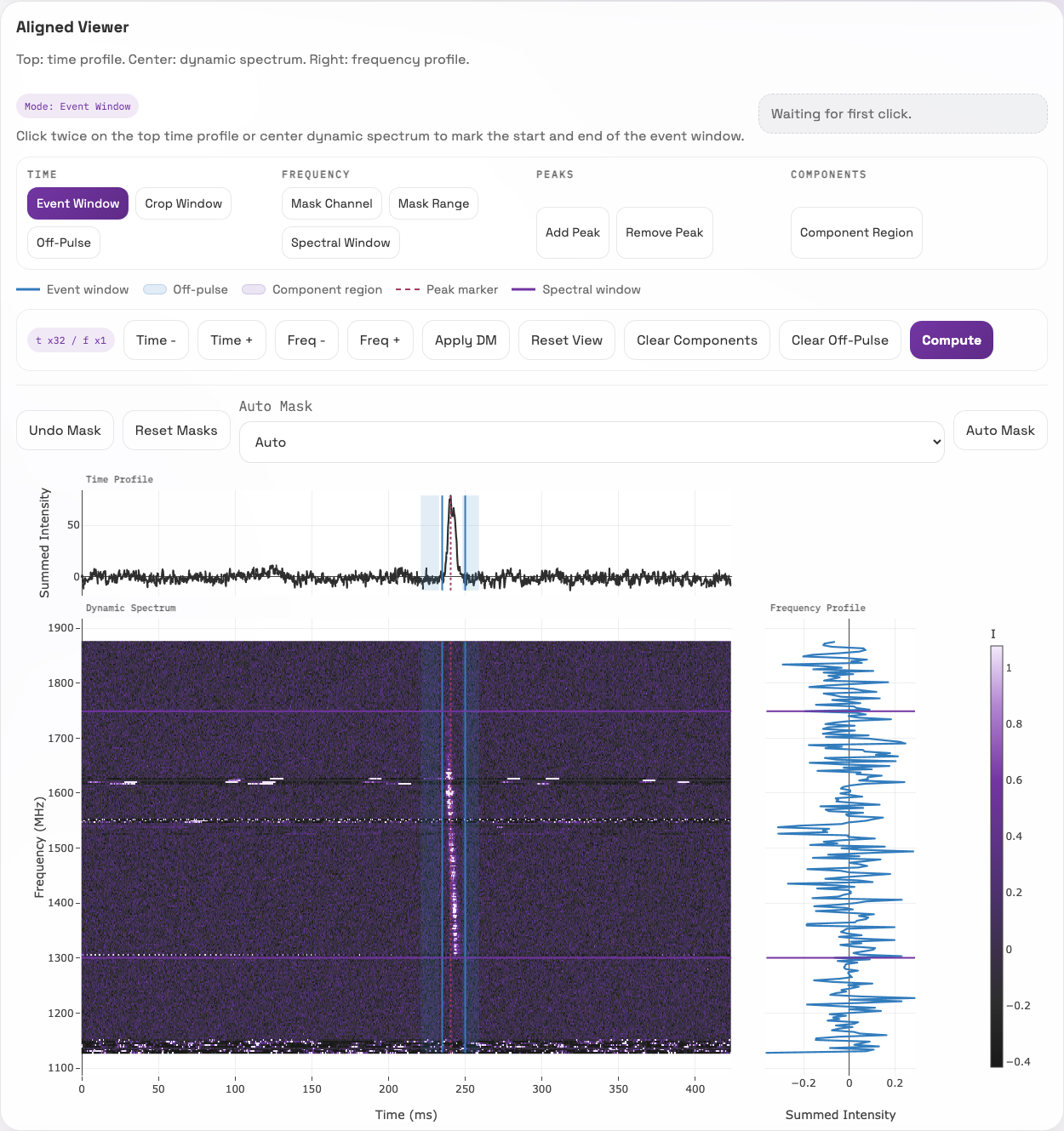
Prepared GBT selection. The narrow blue band around the burst is the event window; the pale blue regions on either side are off-pulse references. Purple horizontal lines delimit the spectral window. White horizontal streaks in the waterfall are visible interference; this reference intentionally uses no mask.
4. Compute measurements
Click Compute. The full-precision outputs are in the downloadable reference summary.
| Quantity | Reference value |
|---|---|
| Peak S/N | 27.461986 |
| Integrated event S/N | 69.760504 |
| Fluence | 4.032204 Jy ms |
| Peak flux density | 0.714226 Jy |
| ACF width | 5.618760 ms |
| Event duration | 15.073280 ms |
| Selected spectral extent | 448.242188 MHz |
| Peak position within the cutout | 240.517120 ms |
These flux estimates use the preset SEFD without an observation-specific SEFD
uncertainty. FLITS therefore labels their uncertainties statistical_only
and sets the corresponding publishable flag to false. This is an expected
limitation of the example. Supply an independently justified calibration and
its uncertainty before interpreting these as fully calibrated scientific
measurements. The reference does not supply a source distance or redshift.
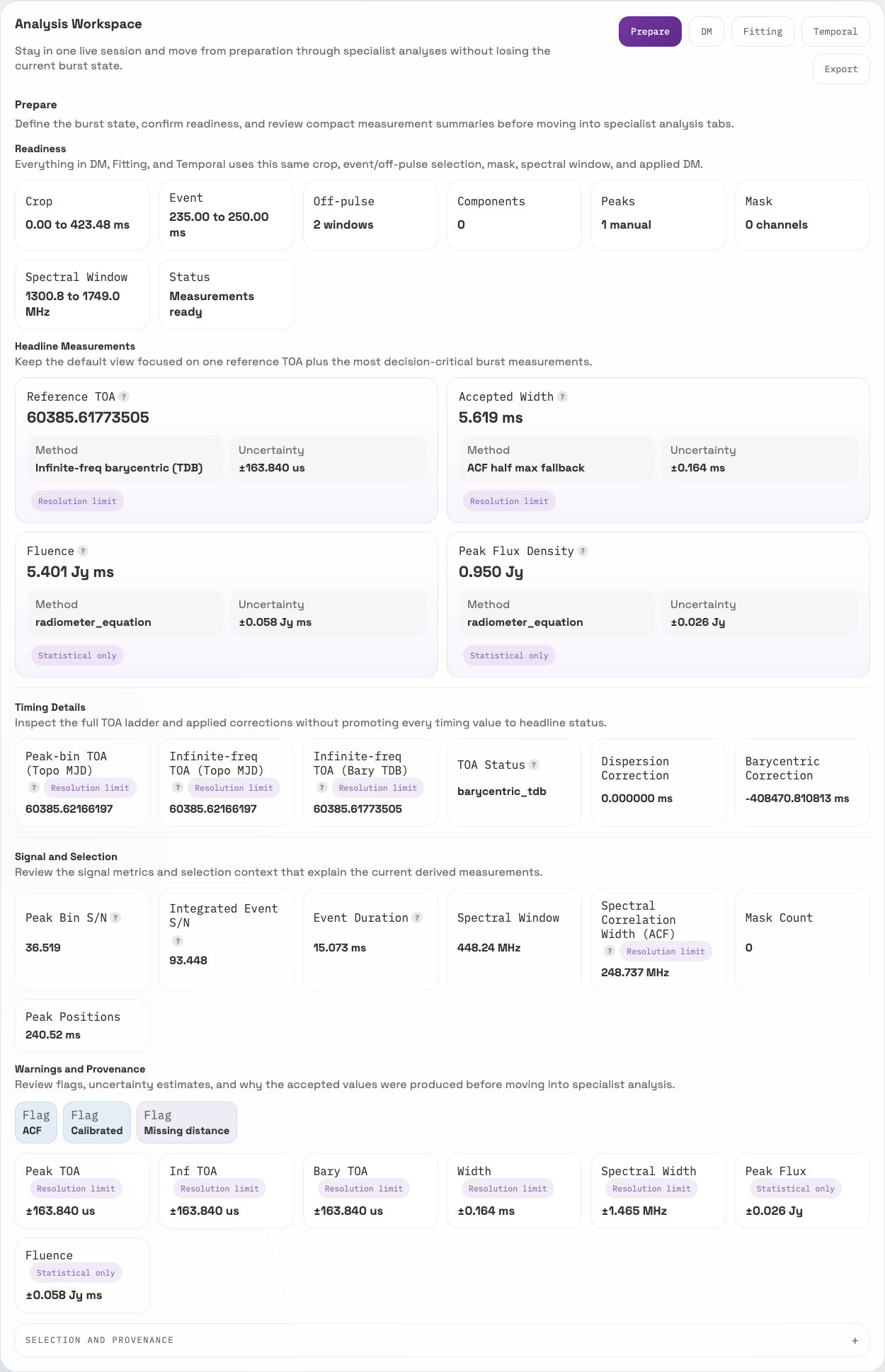
The Prepare tab connects the selected windows to the measured quantities. Fluence and peak flux carry a “Statistical only” label because this example does not provide an SEFD uncertainty. The displayed TOA fields are outside the validated reference checks for this already-dedispersed cutout.
5. Run a residual DM sweep
In the DM tab, select DMphase, center 0, half range 10, and step
0.5. The expected fitted residual DM is about 5.409762 pc cm^-3, with a
sampled maximum of 5.5 pc cm^-3 and fit status dmphase_weighted_polyfit.
Keep the session DM at zero for comparison with the reference; applying the best-fit value changes the data used for the measurements above. This sweep demonstrates the diagnostic and does not establish a new astrophysical DM for the source.
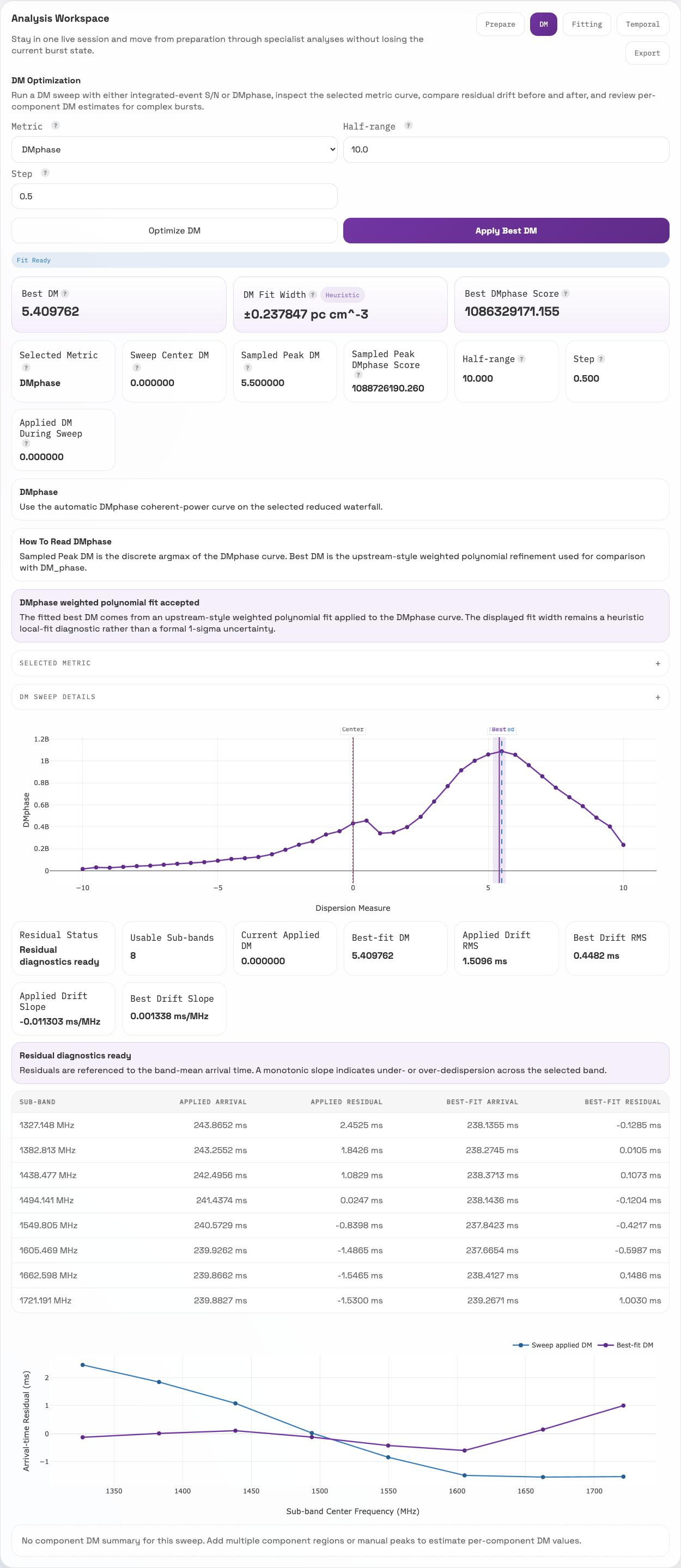
Read the score curve together with the residual diagnostics below it. The sampled peak and fitted best DM are distinct. This screenshot illustrates the residual sweep; the exact reference values are in the downloadable summary.
6. Save and replay the session
Save Session stores the current state in the local snapshot library; Download JSON produces a portable copy. A snapshot records the saved selections, calibration inputs, masks, notes, and analysis results. Keep the original data and software environment alongside it.
To verify the supplied example directly, download gbt-reference-session.json into your working directory and run:
The expected message is check OK - recomputed measurements match the snapshot.
The command recomputes core measurements from the original data. It retains
the saved DM sweep without rerunning it; see Headless Replay
for the scope of replay and numerical comparison.
7. Verify the complete reference calculation
From a FLITS source checkout, the executable example also reruns the residual DM sweep and verifies the measurements, uncertainty labels, and DM fit status:
python examples/gbt_reference_workflow.py \
  --source tutorial-data/flits-tutorial-gbt-frb20240114a-v1.fil
It checks the source checksum and compares numerical outputs at a relative
tolerance of 1e-6 and an absolute tolerance of 1e-8. Successful verification
prints PASS: GBT measurements, uncertainty labels, and residual DM sweep match the reference.
Ordinary runs do not overwrite the reference files. Maintainers can regenerate
them deliberately with --write-reference when changing the documented example.