Exports and Snapshots
FLITS supports both export bundles and full session snapshots.
Export bundles
Use the export workflow when you want shareable outputs such as:
- structured JSON results
- plots
- analysis windows
- catalog-style artifacts
- array-based products
The export preview helps you see what is currently available from the session state before downloading anything.
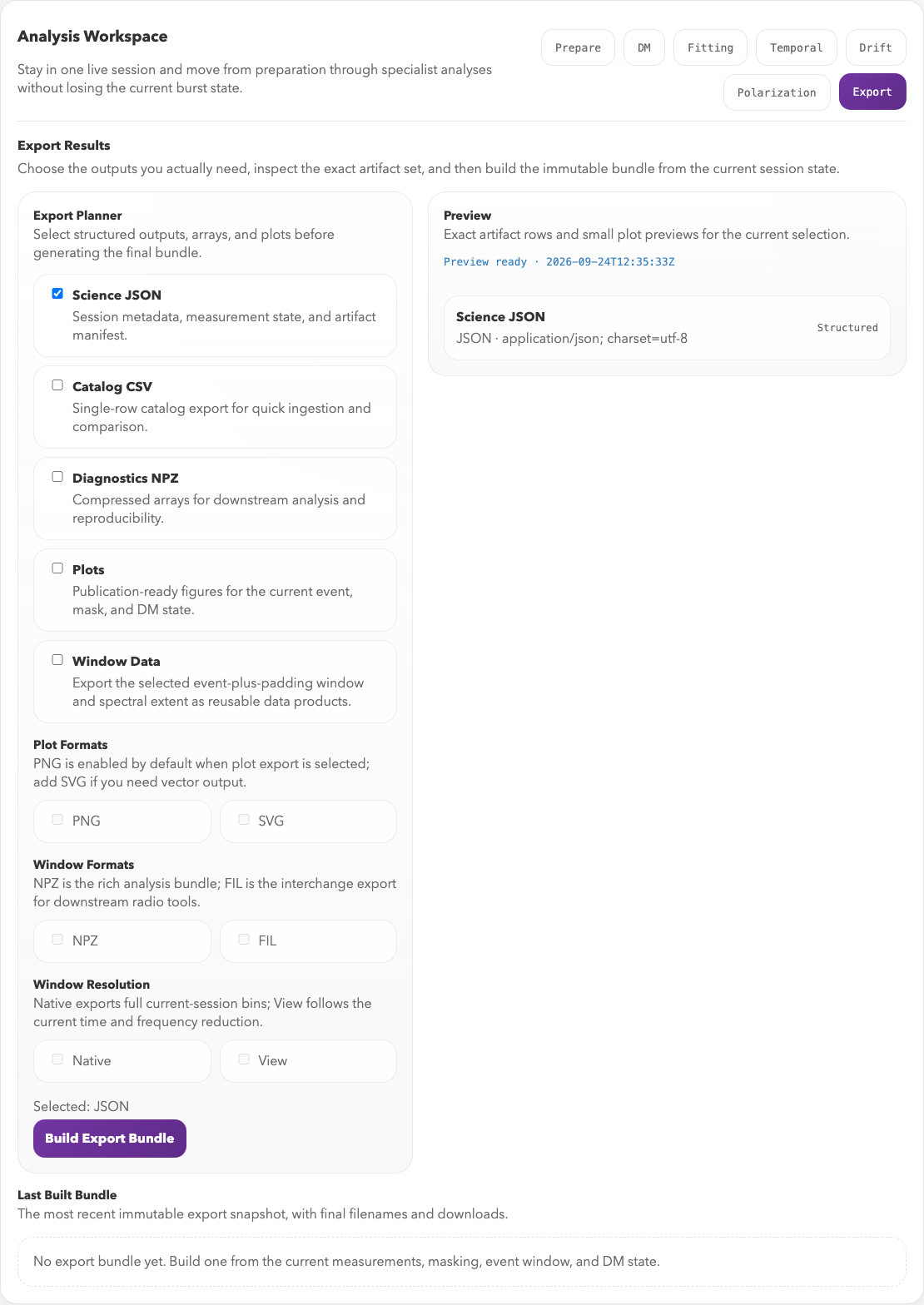
Choose output types on the left and inspect the exact artifact list on the right. Build Export Bundle creates the selected products from the current session state.
Session snapshots
Session snapshots capture the analysis state itself rather than just the final outputs. They are useful for:
- pausing and resuming work
- sharing a reproducible interactive state
- archiving the exact crop/mask/selection choices used in an analysis
Use Save Session to write the current session next to the source data in a
snapshots/ folder. If the session was opened from an existing saved snapshot,
Save Session updates that JSON file. Use Save Copy when you want a
timestamped copy instead. The Saved Sessions browser can search stored
snapshots by source, file name, note text, preset, and DM, then reopen a
matching session directly.

The Session panel saves or reopens the full interactive state. Download JSON makes a portable snapshot; the Export tab above builds derived artifacts.
Snapshots do not embed the raw filterbank data. To share a snapshot with someone
else, use Download JSON or send the saved JSON file and make sure they start
FLITS with --data-dir or FLITS_DATA_DIR pointing at a directory that
contains the same source data file. FLITS records the source file name,
data-directory-relative path when available, file size, SHA-256 content hash,
and scientific metadata so the import can find moved/copied data and reject the
wrong file.
File longevity and software versions
Snapshots and science results use JSON; tables use CSV; diagnostic arrays and
selected windows use NumPy NPZ; plots use PNG/SVG; and selected windows can
also be exported as SIGPROC .fil files with JSON metadata. NPZ products
contain numeric and string arrays and can be loaded with
numpy.load(path, allow_pickle=False). These products do not depend on
pickled Python classes, and stored values can be inspected without running
the original FLITS analysis.
Reading a stored value and recomputing it are different guarantees. A new FLITS or dependency version can change a calculation even when the input file and selections are identical. JSON or HDF5 alone cannot prevent that.
Starting with session schema 1.7 and export schema 1.9, FLITS captures
the FLITS and Python versions, operating system and architecture, installed
package versions (including optional fitburst), and available source
identities. Direct Git installs include their recorded commit; source/archive
installs include available installer metadata. FLITS source is fingerprinted,
with its commit and whether its package files are modified when Git is
available. A schema version identifies the file layout, not this environment.
The software_provenance record separates the environment saving the file
(saved_with) from the origins of individual products. The environment
records are keyed by a SHA-256 of their contents. Reopening a session or
recomputing core measurements preserves the original identity of an older
fit. A failed fit also preserves the provenance of any previously retained
fit values. Inputs from other analyses retain their own identities. Older
files without provenance are marked not_recorded; a later save does not
invent their original environment. Replay reports missing or changed
environments, and the interface notifies you on import or reopening.
Science JSON and export manifests carry the full record. CSV has a quoted
software_provenance_json column; NPZ has a JSON string array (or includes
it in window_metadata_json). PNG/SVG store it in their description metadata.
SIGPROC files must be kept with their .meta.json sidecar. Metadata may be
lost if an external image editor rewrites a plot; preserve the original bundle.
Capture occurs once per FLITS process, when its first session is constructed. Restart FLITS after changing code or packages. Recorded versions describe installed distributions, not a complete binary/container image; source revisions can be unavailable for wheels or packages without source metadata. The source fingerprint covers Python files, not every native library or data dependency. Local source paths and machine hostnames are omitted; direct URLs have their userinfo, query, and fragment removed.
Compatibility tests use unmodified serializers from releases 0.2.0, 0.2.1, 1.0.0, 1.1.0, and 1.2.1. Their stored measurements and selections survive loading. In this regression example, recomputation matches from 0.2.1 onward; 0.2.0 has five known uncertainty-field differences introduced by the 0.2.1 uncertainty-reporting change. Tests also open historical exports with standard readers. These tests cover specific fixtures, not every possible analysis or future release. Schema 1.0 cached results are deliberately invalidated, and unknown future session schemas are rejected before reading the data.
Recommended practice
For an analysis you intend to publish, preserve:
- The original input data and the session JSON, including its source checksum.
- The export bundle containing the values, arrays, and plots you actually use.
- The exact FLITS release or source commit and the analysis environment:
Python and dependency versions, including the
fitburstrevision if used.
For example, run these commands in the environment that performed the analysis, and keep their outputs beside the snapshot:
python --version > python-version.txt
python -m pip freeze --all > environment-requirements.txt
flits --version > flits-version.txt
For editable or local source installs, also record the commit and preserve any uncommitted changes; a package version or local path alone does not identify that code. Record the operating system and any container image digest used. An environment listing is provenance, not a complete archive of the software. Repository dependency pins document tested environments but do not automatically describe an arbitrary user's installation.
Use headless replay with --check to compare the core
measurements against their saved values. Replay also recomputes recorded width,
drift, and in-session polarization analyses; the drift settings retain the
Monte Carlo random seed. It does not rerun optional model fits, DM scans,
or temporal/spectral structure analyses. Preserve their stored outputs and
their original environment if you need to repeat them.