FLITS
FLITS, the Fast-Look Interactive Transient Suite, is browser-based software for
interactive FRB burst analysis. It brings burst inspection, masking,
measurement, DM optimization, temporal/spectral diagnostics, optional
model-based fitting, and export into one workflow-oriented tool. Input
formats include SIGPROC filterbank (.fil), PSRFITS search/fold data
(.fits, .sf), and CHIME/FRB HDF5 (.h5, .hdf5) including public
catalog waterfalls and beamformed BBData power files, extensible via a
plugin-based reader framework.
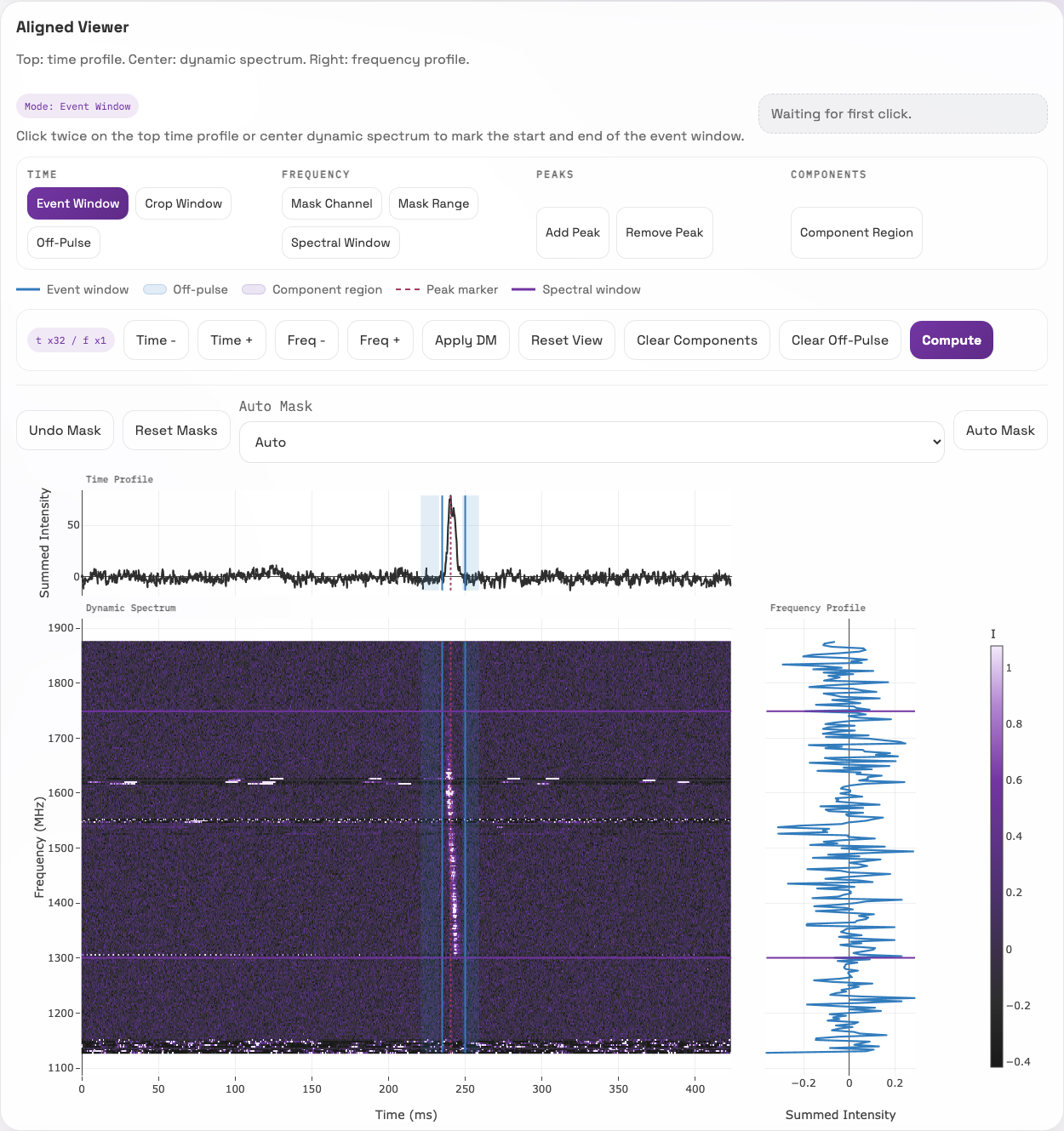
The aligned viewer in the GBT guided workflow. Blue marks the event and off-pulse time windows; purple lines mark the selected frequency range. The three plots share the same selection state.
Why FLITS exists
Measuring a detected burst involves selecting an event window and noise reference, masking interference, choosing a frequency range, and refining the dispersion measure (DM). These choices affect the resulting measurements and must be preserved to interpret and reproduce them.
FLITS was built for a repeater campaign spanning GBT at L and P band, Nançay, Westerbork, Onsala, Stockert, and CHIME. A common reader interface and configurable telescope presets support analysis across their formats and calibration conventions. The session retains the selected state so collaborators can reopen it and recompute supported measurements from the original data.
FLITS builds on specialist search, data-processing, and analysis packages. It connects measurements through a shared session model with explicit calibration and uncertainty metadata. Flux and fluence estimates without a supplied SEFD uncertainty are flagged as having an incomplete uncertainty budget.
Not a search pipeline
FLITS starts from a burst you already have. Candidate generation and detection are out of scope.
What FLITS is good at
- Loading local SIGPROC, PSRFITS, or CHIME/FRB HDF5 files into a browser-based analysis session.
- Interactively defining crop windows, event windows, off-pulse regions, and spectral windows.
- Masking problematic channels before running measurements.
- Reporting burst measurements together with provenance and exportable state.
- Comparing DM metrics and inspecting residual arrival-time diagnostics.
- Running temporal-structure and spectral analyses on the current selection.
- Exporting structured results, plots, and session snapshots.
Quickstart
Then open http://127.0.0.1:8123.
If you want optional selected-event model fitting as well:
pip install "fitburst @ https://github.com/CHIMEFRB/fitburst/archive/3c76da8f9e3ec7bc21951ce1b4a26a0255096b69.tar.gz"
Start here
- Use Quickstart if you want the shortest path from install to first session.
- Use Guided Workflow for a concrete GBT burst example with fixed selections, reference measurements, a residual DM sweep, and a downloadable session for replay.
- Use Installation and Deployment if you need Docker, Apptainer, or remote/HPC usage.
- Use Session Workflow once the interface is open and you want to know how to work through a burst.
- See Supported Formats for the full reader matrix and detection rules.
Analysis areas
- Burst Localization
- Measurements
- DM Optimization
- Temporal and Spectral Analysis
- Multiscale Temporal Power
- Sub-Burst Drift
- Rotation-Measure Synthesis
- Model Fitting
Developer docs
References
Methods implemented in FLITS are attributed on the References page.