Quickstart
This page is the shortest path from install to a working FLITS session.
1. Install FLITS
Optional model fitting is powered by fitburst and must currently be installed
separately:
pip install "fitburst @ https://github.com/CHIMEFRB/fitburst/archive/3c76da8f9e3ec7bc21951ce1b4a26a0255096b69.tar.gz"
2. Start the local server
Point FLITS at a directory containing your filterbanks:
Open http://127.0.0.1:8123.
The browser opens with a New Session form. Choose the source file and DM there, then use Load Session. The Session panel in the left sidebar is for saving or reopening a session after it has loaded.
3. Load a burst file
FLITS reads SIGPROC filterbank (.fil), PSRFITS search/fold data (.fits,
.sf), and CHIME/FRB HDF5 (.h5, .hdf5) files, including CHIME public
catalog waterfalls and beamformed BBData power files. See
Supported Formats for the full matrix.
Inside the UI:
- Pick a file from the directory list or type a path manually.
- Enter the burst DM.
For CHIME catalog waterfalls FLITS will suggest
0, and for CHIME beamformedBBDatafiles it will suggest the file'sDM_coherent. - Adjust telescope/preset settings if the detected preset is not what you want.
- Load the session.
If FLITS can identify the observing setup, it may populate default calibration values such as SEFD. If it cannot, use the generic preset or set an explicit SEFD yourself.
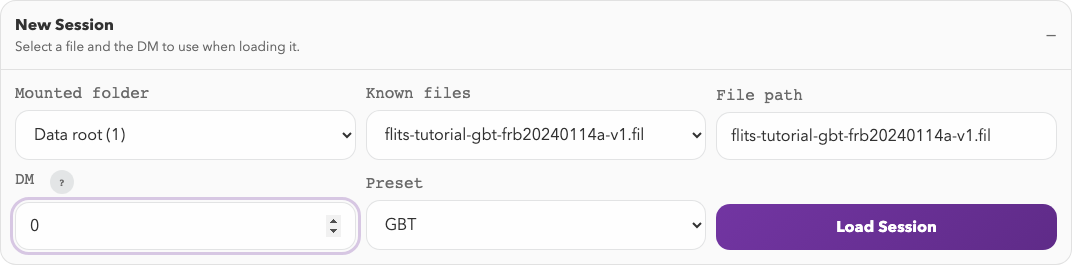
The New Session form for the GBT example. For your own data, choose your file and its appropriate DM before loading.
4. Work through the session
The typical order is:
- Prepare the crop, event window, off-pulse window, spectral window, and mask.
- Compute measurements.
- Run DM optimization if needed.
- Run temporal or fitting tools on the current selection.
- Build an export bundle or save a session snapshot.
For the interface walkthrough, continue to Session Workflow.
For a concrete end-to-end example with a GBT burst, continue to the Guided Workflow.